
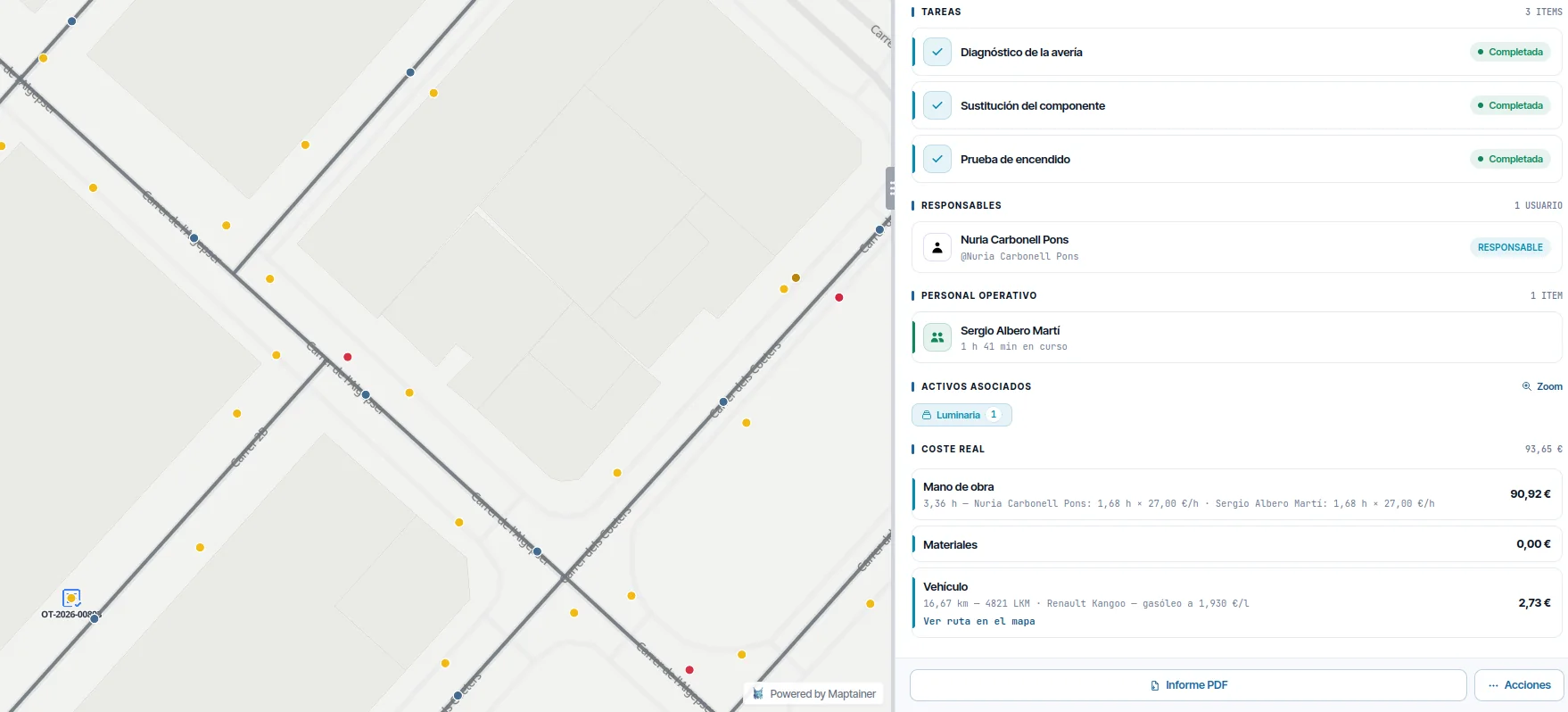
You close the work order and you still do not know what it cost.
Materials leave the warehouse at average price. The technician logs hours at the end of the week. Kilometres go on an expense sheet that nobody matches against the job. So the cost that ends up on the work order is an estimate, and anyone who looks closely knows it. In Maptainer the work order runs its whole lifecycle without leaving the map and closes with the true cost of materials, hours and kilometres.
The work order is where the asset, the person, the material, the time and the travel all meet. If any of those pieces lives in another system, the cost never adds up.
You walk into the contract review with figures, not estimates.
- You see the margin while the work is being done Every closed work order carries its consolidated cost: materials at the real cost of the stock movement, hours at each person's cost and kilometres costed at the day's fuel price.
- Stock goes down when it is used, not when someone remembers Material used is deducted from stock on the work order itself, including the mobile warehouse in the vehicle.
- Nobody drives sixty kilometres to find the material is missing The preventive plan is defined by asset type or for a specific asset, with its frequency, and the system generates the work orders automatically. First it checks stock for what the task uses and warns you if there is not enough.
- You can prove what was done Before and after photographic evidence, geolocated and timestamped, and a handwritten sign-off signature with GPS, date and device details.
- The SLA is measured, not argued about The status history gives the response and resolution times that are checked against the SLA target.
Eight states, because they are a real sequence.
The numbering is not decorative: it encodes the order in which things happen and the intervals that later feed the KPIs.
Created
From the map, from an asset record, from an incident or by recurring scheduling.
Assigned
To a person or a team, with the eligibility engine checking skills and availability.
Planned
With an execution date and time slot.
In progress
Manually, or automatically when arrival at the work site is detected.
Paused
By the technician, or automatically at the end of the working day.
Executed
With forms completed, photographic evidence and sign-off signature.
Pending review
A validation queue before closing, for whoever needs it.
Closed
With the consolidated cost of materials, hours and kilometres.
Everything you need to carry it out and to justify it.
- Tasks and maintenance type With the trades and skills required, which are what later drive assignment.
- Priorities With their associated criticality and, where there is an SLA, their response and resolution deadlines.
- Field forms Assigned by maintenance type, by task or by asset type. Twelve field types, with repeatable sections and dependency rules.
- Sign-off signature Handwritten on the device, with GPS, date and device details. It is a simple electronic signature with an evidence package.
No report gets stuck in an email.
An incident comes in from the web, from the phone or from the customer portal, with its source recorded. It is classified, the SLA that applies by criticality and customer is attached, and it becomes a work order when appropriate.
The status history is kept. When the customer asks how long you took, the answer does not depend on anyone's memory.
List, calendar, kanban and by technician.
The same workload, seen four ways. Plus a queue of work orders pending review for whoever validates before closing.
Frequently asked questions
Is the signature legally valid?
Can I issue an invoice from the work order?
How are materials valued?
Last updated:
In distributed maintenance, travel is a large part of the cost.
Next: how every kilometre is charged to its work order, at that day's fuel price.