
A pipe bursts and you need to know which valves to close and who loses supply during the shutdown.
In most operations that answer lives in the head of the longest-serving supervisor or on a drawing nobody updates. The mapping data has the lines, but it does not know what feeds what. With Network topology, the pipe, channel or cable layers you already have in Maptainer become a connected network, and the shutdown comes out calculated with its valves, who is affected and its work order.
What stops happening to you.
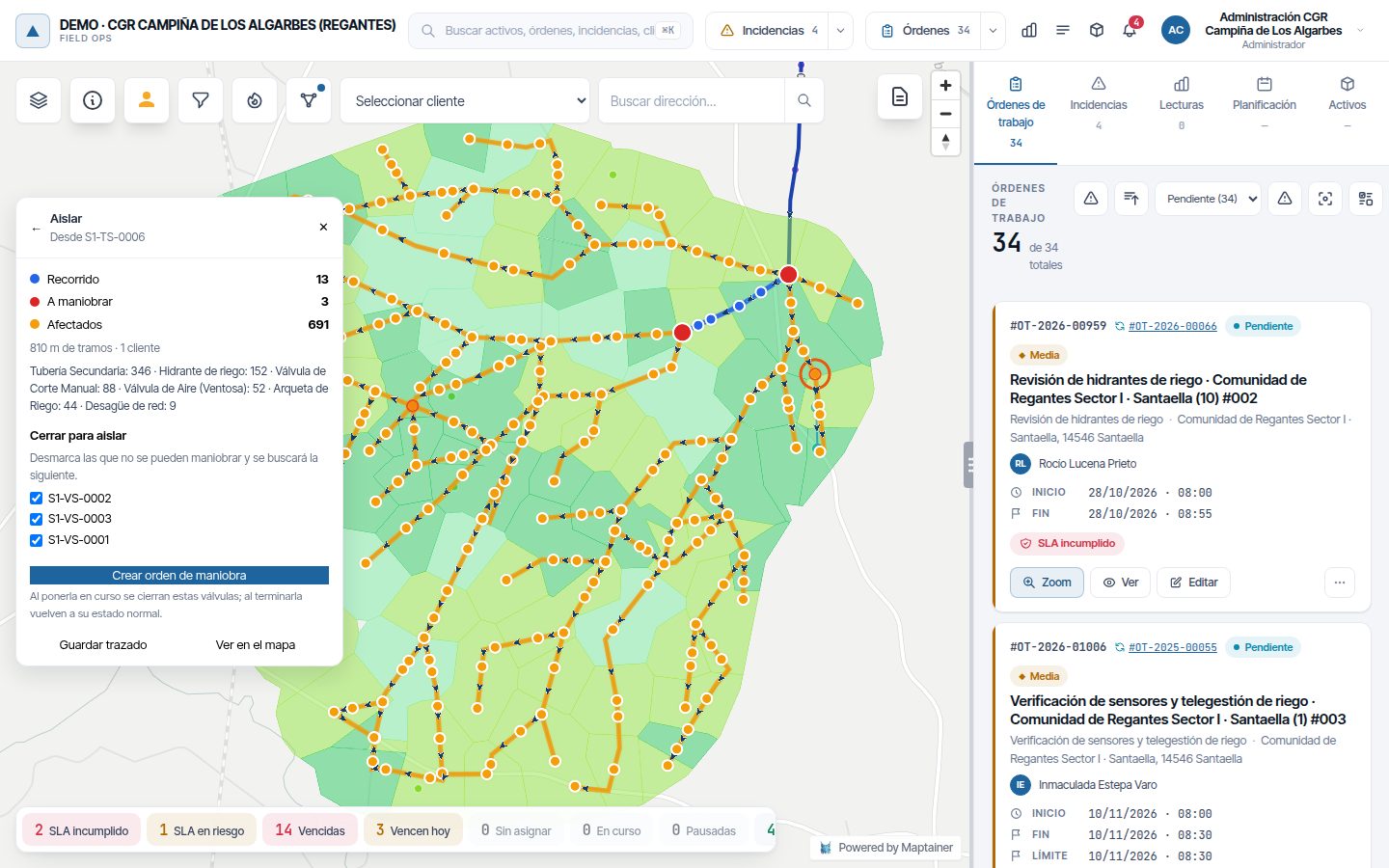
- You stop closing extra valves just in case. Isolation returns the minimum valves needed to cut flow to the point. If one is seized or buried, you untick it and the calculation finds the next one.
- You stop finding out who is affected from the phone calls. Before closing anything you know which hydrants, service connections or lighting points lose supply, with the metres of section and the customers for each.
- You stop maintaining a network separate from the inventory. The network is calculated from the assets already on the map. When someone moves, adds or decommissions an element, that area is recalculated automatically.
- You stop discovering mapping errors in the field. An end that does not touch its valve or a duplicated section shows up as an error in the office, with its recommended fix, not on the day of the failure.
It is not drawn again. Each layer is told what role it plays.
You choose which layers make up the network and what each one does within it. Maptainer joins the sections to the elements touching their ends, with a connection tolerance in metres to forgive imprecise drawings, or by start and end node codes if your mapping data carries them. Where two sections meet with no asset, it creates the junction itself.
Layers without a role remain ordinary assets. The same organisation can have several networks, such as the irrigation network and the medium-voltage network of a park, each with its own layers.
| Role | What it does | Examples |
|---|---|---|
| Section | Joins two nodes | Pipe, channel, cable |
| Node | Joins sections without blocking flow | Chamber, air valve, bulk meter |
| Source | Where the flow starts | Canal intake, tank, reservoir, pumping station, control centre |
| Network end | The flow arrives and goes no further | Hydrant, outlet, drain |
| Switching element | Can be opened or closed | Isolation valve, switch |
| Barrier | Always blocks the flow | Blank, separation joint |
| In-line branch | Hangs off the section without splitting it | Lighting point, service connection |
Which way the water or the current goes, depending on your network.
Upstream and downstream depend on this choice. Isolation works with all three.
| Option | How it is calculated | For which networks |
|---|---|---|
| As drawn | Each section runs from its first vertex to its last, in the order it was drawn. | Irrigation and sewerage |
| From the sources | The network is traversed from every source, without crossing closed elements or barriers, and each section is oriented as it is reached. | Water supply and electrical networks |
| No direction | Only what is connected to what is calculated. | Any, for checking connections |
From a right-click on the section to the switching work order.
With the network switched on in the map, right-clicking a section or an element offers Isolate this point. The result shows the zone left isolated, the valves to operate and everything that stops receiving flow. Those affected can be more than what lies downstream of the point: if the isolated zone includes a junction, the other branches leaving it lose supply too, and the calculation counts them.
That isolation is saved as a shutdown and turned into a switching work order, which is just another work order, with the point and the valves already filled in. From then on the shutdown follows its work order.
- Upstream and downstream From the record of any asset on the network: everything that feeds it, back to the sources, and everything it feeds. A closed valve or a barrier stops the trace.
- State of every valve Normal state and current state, with who opened or closed it and when. Closed valves show on the map with a red ring.
The work order is planned
The shutdown is planned, with its valves, who is affected and their customers.
The work order goes in progress
The shutdown goes in progress and the valves are recorded as closed. If the work order is paused, they stay closed.
The work order ends
Completed, validated, closed or cancelled: the shutdown ends and the valves return to their normal state. If someone closed one of them independently in the meantime, it stays as they left it.
Mapping data never arrives clean. What matters is how much it costs to fix.
Every time the network is calculated, Maptainer checks its connections and records what is wrong: loose ends, unconnected elements, a valve sitting on a section that is not split at it, T-junctions without a node, opposing directions, sections not reached from any source, node codes that do not exist, duplicates and multi-part sections. Ten error types, each one flagged on the map.
For each error, Maptainer looks at the surroundings and proposes a recommended fix, with the reason: snap the end to the node, split the section, reverse the direction, write the node codes or keep one of the duplicates. If it is a false error, such as a genuine network end, it is ignored with the reason recorded.
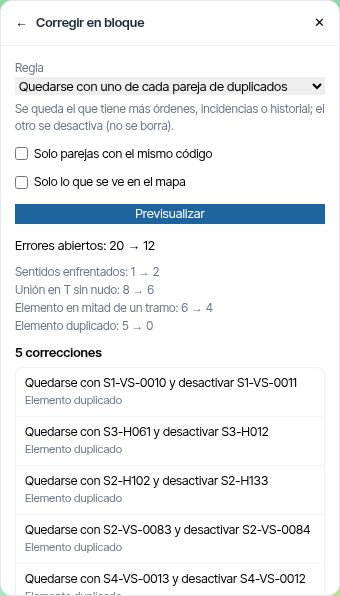
- Bulk correction Snap hundreds of loose ends, fix opposing directions or keep one of each pair of duplicates in one go, seeing the result on the map first. Whatever does not fit the rule is left for manual review.
- Every batch can be undone The assets go back to how they were. Anything someone changed afterwards is left alone, and you are told which ones.
- Nothing is lost when correcting When a section is split, the upstream part keeps its work orders and history. When a duplicate is resolved, the other one is deactivated, not deleted.
If your network comes from CAD, start with the assessment.
A network comes out properly connected first time if the mapping data follows a few simple rules: one layer per element type, ends that touch their valves and chambers, sections split at every real node and sources registered. With a well-maintained GIS, checking them is enough. With old drawings or CAD files, allow for a clean-up phase.
That is why, before your first network is loaded, the Maptainer team analyses your files and tells you what needs correcting and where it is best done: structural issues in your GIS, one-off ones inside Maptainer with bulk correction. If your organisation starts from a sector template with a network, such as irrigation or lighting, the network arrives already created with its roles.
Network topology is an add-on priced on request, because it depends on the size of the network and the state of its mapping data. Step-by-step set-up in the Network topology manual; the concept, in the glossary.
What it calculates and what it does not.
Network topology deals with connectivity: what is joined to what, in which direction and what needs closing. It does not perform hydraulic or electrical calculations: it gives no pressures, flows or voltage drops. If your operation uses a hydraulic model, that is still the tool for the job.
Nor does it operate anything in the field. A valve's state in Maptainer is the record of the operation a person carried out, not a command to an actuator. What it does do is notify other systems: shutdowns and valve operations can be sent by webhook, and the network can be read through the public API.
Frequently asked questions
Does the network have to be drawn again?
Does it work for electrical networks?
How much does it cost?
What happens to errors while the network is in use?
Last updated:
Do you operate a water, irrigation or sewerage network?
That page brings together the network, the meters and the reading campaigns, in your vocabulary.