
Introduction
Maptainer does not adapt to each ERP’s structure, nor the ERP to Maptainer’s. Each one publishes how it talks, and in between there is an integration layer that translates: it is built by the consultant or IT person who maintains the ERP, with a tool such as SAP Integration Suite, Power Automate or their own program.
The integration has three pieces. All of them are set up in the administration area → API and data backups.
| Piece | Direction | What for |
|---|---|---|
| Create issues | ERP → Maptainer | A breakdown notification in the ERP comes into Maptainer as an issue |
| Webhooks | Maptainer → ERP | Maptainer notifies straight away when a work order or an issue changes |
| Reading data | Maptainer → ERP | The ERP reads hours, materials and catalogues to book costs or keep a copy |
Prerequisites
- The maintenance module subscribed: issues and work orders depend on it.
- Being the organisation’s administrator. Keys and webhooks are not delegated by role.
- Someone to set up the ERP side: the client’s consultant or IT person. They need an
https://address to receive notifications. - A test environment for the ERP. Avantgeo can prepare a test organisation in Maptainer; ask support.
Which system owns each piece of data
Before you start, decide which system owns each piece of data. If both can change the same thing, the last one to write wins and the other never finds out. This is the usual proposal:
| Data | Owner | The other system… |
|---|---|---|
| That a breakdown or notification exists | ERP | Maptainer receives it as an issue and stores the notification number |
| Planning, worker assignment and routes | Maptainer | The ERP does not touch it |
| Execution: statuses, hours, photos, forms and signature | Maptainer | The ERP receives it by webhook and reads it |
| Closing the notification | Maptainer notifies, the ERP closes | The ERP closes the notification when the closure arrives |
| Costs and invoicing | ERP | Reads from Maptainer the hours and material used |
| Accounting data of the asset (inventory no., cost centre) | ERP | In Maptainer it goes in an asset field, if needed |
| Location and geometry of the assets | Maptainer | The ERP does not touch it |
Preparing the integration
- Meet whoever maintains the ERP and fill in the mapping sheet together.
- Create an API key for the ERP with the Create issues permission (see below). If the ERP belongs to a client, limit the key to that client.
- Create a webhook with the address the integrator gives you and the events the ERP needs.
- Give the integrator the key and the webhook secret. Both are shown only once: copy them when you create them.
- Test in the test environment: a normal creation, the same notification sent twice, an unknown code and the closure of a work order.
- To go live, create a new key and a new webhook. The test ones are not reused.
- During the first week, check the webhook’s Deliveries every day.
The ERP key
- In API and data backups, click New key.
- Enter the Name, for example “SAP PM”.
- Tick Create issues. Tick Work orders too if the ERP has to read hours and materials.
- If the ERP belongs to a client, choose it in Only one client. That key can only have Create issues.
- Click Create key, click Copy and give it to the integrator.
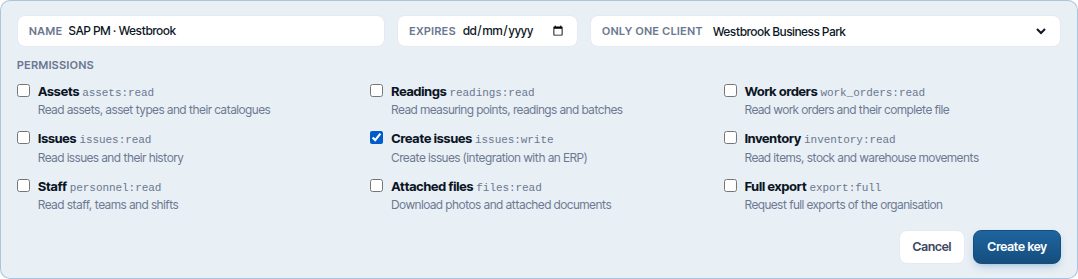
A single-client key always creates issues for that client and only with that client’s assets. It does not see other clients’ issues either. The other key options are in Create an API key.
The webhook
- In the Webhooks card, click New webhook.
- Enter the Name and paste the Destination URL (https) the integrator gives you.
- If you only want one client’s changes, choose it in Client.
- Tick the Events. To close the ERP’s notifications, Work order closed, Issue closed and Issue rejected are usually enough.
- Click Create webhook, copy the secret and give it to the integrator.
- Click Test: Maptainer sends a test notification and shows what the ERP answered.

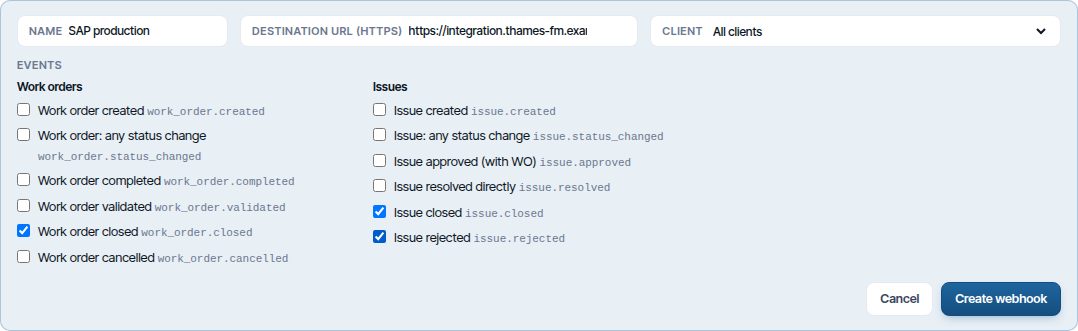
Deliveries, retries, rotating the secret and what happens if the ERP stops answering are in Webhooks and Deliveries, retries and deactivation.
How notifications come in from the ERP
A notification from the ERP comes in as a pending issue, with Integration (API) in Source/Channel. From there it follows the same path as any other: it is reviewed, turned into a work order and closed. The client’s SLA, the sector’s branch and the usual alerts apply to it.
- Type, criticality and assets arrive by their code. That is why the code of each asset in Maptainer should be the same as in the ERP.
- The ERP’s notification number is stored with the issue. Maptainer does not allow two issues with the same number.
- No duplicates: if the connection fails and the ERP repeats the request, no second issue is created.
- No asset: the ERP can send an address or coordinates.
Current limitation
The ERP’s notification number is not shown on the issue record: Maptainer stores it and it travels in the webhooks. Workaround: have the ERP also put it at the start of the title.
How changes go back to the ERP
Every time something the webhook has ticked happens, Maptainer sends a notification to the ERP within seconds. A work order’s notification carries the issues it resolves, with their ERP notification number: that way the ERP knows which notification to close.
| Event | Usual use in the ERP |
|---|---|
| Work order closed | Close the notification and book hours and material |
| Work order completed or validated | Mark the notification as finished, if the client closes later |
| Issue closed or resolved directly | Close the notification when no work order was needed |
| Issue rejected | Close the notification as “not applicable” |
| Issue approved (with WO) | Set the notification “in process” |
| Measurement confirmed or voided | Record the measured quantity (kilos, litres, hours) or withdraw it. See Measurements |
| Third-party handover recorded | Record the dispatch to the waste manager or plant, with its delivery note |
If the ERP does not answer, Maptainer keeps trying for almost two days. If it accepts no notification for 3 days, the webhook is disabled automatically and the administrators receive an email.
Equivalences with SAP PM and Business Central
Each ERP’s tables are different, but the concepts match. Technical names are a guide: the integrator confirms them in the client’s installation.
| Maptainer | SAP PM | Business Central |
|---|---|---|
| Issue | Maintenance notification (types M1 and M2) | Not standard. With the Service module, a service order line |
| Work order | Maintenance order | Service order, with the Service module; otherwise a job |
| Asset | Equipment or functional location | Fixed asset or service item |
| Issue type | Notification type or damage code | — |
| Criticality | Priority: 1 Critical, 2 High, 3 Medium, 4 Low | Service order priority |
| Maintenance type | Order type and activity type | Service order type or job task |
| Client | Customer | Customer |
| Branch | Maintenance planning plant | Dimension or location |
| Item and warehouse | Material and storage location | Item and location |
| Hours of an order | Time confirmation | Job journal or service line |
| Material used | Goods issue to the order | Item journal or service line |
Statuses translate like this (a proposal, adjusted in the mapping sheet):
| Maptainer | SAP PM |
|---|---|
| Issue pending | Notification outstanding |
| Issue approved | Notification in process |
| Issue resolved or closed | Notification completed |
| Issue rejected | Notification completed with a rejection reason |
| Order pending | Order created |
| Order in progress or paused | Order released |
| Order completed | Order released with final confirmation |
| Order validated or closed | Technically completed (and closed after settlement) |
| Order cancelled | Deletion flag or closure without cost |
Mapping sheet
It is filled in with the client at the first meeting. Each answer is a decision the integrator needs to build the integration.
| # | Decision | Proposal |
|---|---|---|
| 1 | Which flows: notifications to issues, closures to the ERP, costs to the ERP, data copy | |
| 2 | Which ERP notification types are sent to Maptainer | |
| 3 | Equivalence of each notification type or damage code with an issue type | One row per value |
| 4 | Equivalence of priorities and criticalities | 1 Critical, 2 High, 3 Medium, 4 Low |
| 5 | Whether asset codes are the same in both systems | They should be |
| 6 | Equivalence of clients | |
| 7 | One key for the whole company or one per client | One per client if each has its own ERP |
| 8 | Which event closes the notification | Work order closed |
| 9 | Whether hours and material are booked, and to what: the order, the notification or a job | |
| 10 | Rate or cost centre for the hours | |
| 11 | Webhook address and who keeps the secret | |
| 12 | Who receives the email if the webhook is disabled | Maptainer administrators |
| 13 | Test environments of both systems |
For whoever programs the integration
Everything technical is in API reference, at the top right of API and data backups: each call, the body of each webhook and how its signature is checked.
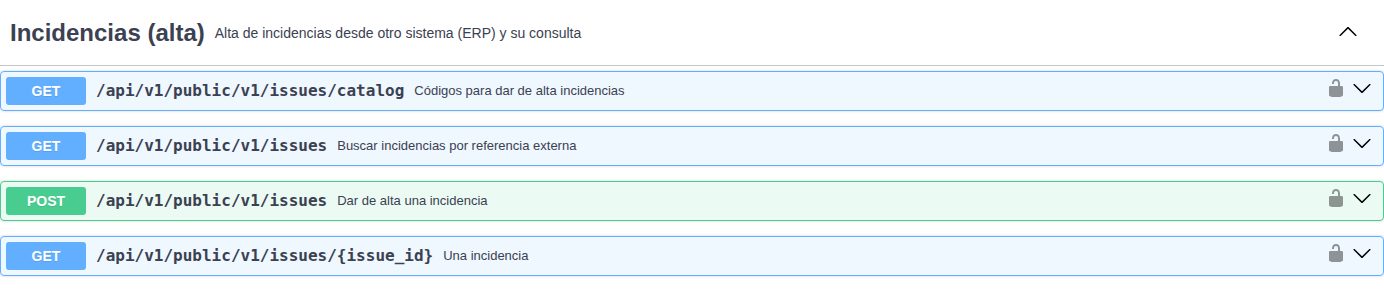
The essentials, for the first conversation with the integrator:
| Topic | How it works |
|---|---|
| Creating a notification | POST /issues with the key in the X-API-Key header. Type, criticality and assets by code; the codes come from GET /issues/catalog |
| Notification number | The external_ref field. A second creation with the same number is rejected and says which issue exists |
| Retries without duplicates | The Idempotency-Key header, one per notification: repeating the call within 24 hours returns the same response |
| Webhooks | Signed according to the Standard Webhooks standard. Answer 2xx in under 10 seconds; each notification carries an identifier to discard repeats |
| Hours and material | In the closure notification itself (total active time, actual start and end) and by reading the order’s data |
| Avoiding loops | Each notification says whether the change was made by an API key, so the ERP does not resend the echo of its own creations |
| Quotas | 120 reads and 60 creations per minute and key |
Current limitations
- Only issues can be created through the API: the ERP cannot create work orders or change or cancel issues already created.
- Webhooks notify about work orders and issues; not about assets, stock or readings.
- The hours and material of one order cannot be requested on their own: they are read in batches.
- The API gives hours and quantities, not amounts: the ERP values them with its rates.
- The ERP’s notification number is not shown on the issue record.
Common problems
| Symptom | Likely cause | Solution |
|---|---|---|
| The webhook shows as Inactive | The ERP accepted no notification in 3 days | When the ERP works again, click Activate and resend what is pending from Deliveries |
| Test says the certificate is not valid | The integrator’s server has an expired or self-signed certificate | The integrator has to install a valid certificate |
| The webhook URL cannot be saved | It does not start with https:// or points to an internal address |
Ask the integrator for a public https address |
| The ERP says the notification already exists | There is already an issue with that notification number | That is correct: the issue was already there. The integrator should treat it as created |
| The ERP says an asset code is ambiguous | Several Maptainer assets share that code | Fix the repeated codes or ask the integrator to use the asset’s identifier |
| The ERP cannot read hours with its key | The key only has Create issues | Create another key with Work orders: a key’s permissions cannot be changed. A single-client key cannot read |
Last updated: